Go Further
Making a Model Your Own
So far everything has been about text agents and the tools around them. This module adds new territory: generating images, video, and audio locally; evaluating whether a model actually fits your work; and fine-tuning one to behave the way you want.
By the end of this module, you’ll understand how fine-tuning works, when to use it versus RAG, and how to run image and audio generation locally.
Generating Images on Your Machine
How It’s Different From Text
Text models predict the next . Image models do something completely different: they start with random noise and gradually remove it until a picture emerges, guided by your text prompt.
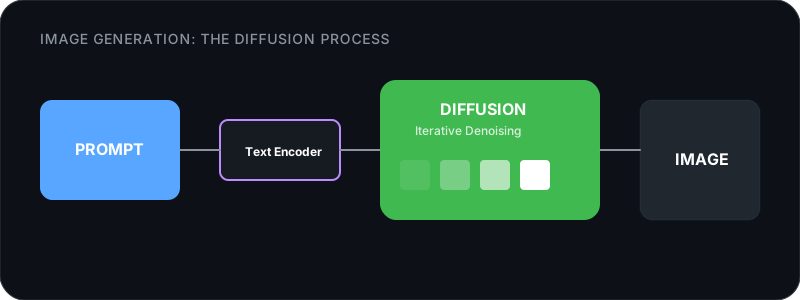
The process is called diffusion. Your prompt goes through a text encoder that converts it to a numerical representation. The diffusion model then runs 20-50 “denoising steps,” each time looking at the noisy image and predicting what the clean version should look like. After enough steps, the noise is gone and you have an image.
Why This Needs a GPU
Text generation is memory-bandwidth-bound: the processor waits for model weights to arrive from RAM. Image generation is compute-bound: the processor is doing math as fast as it can through those 20-50 denoising steps, each one a full forward pass through the model.
That’s why an integrated Intel GPU that runs LLMs fine on CPU can’t generate images at usable speeds. Diffusion needs parallel floating-point compute, which means a real GPU. Apple Silicon works because its unified GPU is strong enough. NVIDIA discrete GPUs are fastest.
| Hardware | LLM text generation | Image generation |
|---|---|---|
| CPU only (Intel/AMD) | Works, slower | Too slow to use |
| Apple Silicon (M1+) | Good to excellent | Good (Metal GPU) |
| NVIDIA GPU (8+ GB ) | Fast | Fast |
What to Run for Image Generation
Two families dominate:
FLUX (by Black Forest Labs) is the current quality leader for open models. FLUX.1 Dev produces images that compete with commercial tools. FLUX.1 Schnell is a distilled version that generates in 4 steps instead of 50, trading some quality for speed. FLUX needs 12-24 GB in full precision, but (same concept as LLM quantization) brings it down to 8 GB.
Stable Diffusion is the older family with a massive community ecosystem. SDXL and SD 1.5 have thousands of community fine-tuned variants, LoRA style adapters, and ControlNet extensions for things like pose control and image-to-image editing. If you want to customize how your images look, the SD ecosystem has the most options.
Tools to Get Started
These tools work like Ollama but for images: they handle model loading, the diffusion pipeline, and give you an interface.
| Tool | Difficulty | Best For |
|---|---|---|
| Draw Things | Easiest | Mac users. Free on App Store, optimized for Apple Silicon. |
| Forge | Easy | One-click web UI. Good middle ground. |
| ComfyUI | Advanced | Power users. Node-based visual workflow, supports every model. |
What’s Realistic on Consumer Hardware
On an M4 Pro with 48 GB: FLUX.1 Dev generates a 1024x1024 image in about 40-60 seconds. FLUX Schnell does it in 8-15 seconds. SDXL takes 10-20 seconds. You can iterate on prompts quickly and produce portfolio-quality images.
On 16 GB (M1 Pro or equivalent): SDXL and quantized FLUX Schnell work. Full FLUX Dev is tight but possible with GGUF Q4. Expect 30-60 seconds per image with the quantized model.
On 8 GB with no discrete GPU: TTS and transcription only. Image generation needs more.
Video, Audio, and Music
Video Generation
Local video generation is now usable on consumer hardware. It requires more compute than image generation because you’re generating many frames with temporal consistency. The model has to keep objects, lighting, and motion coherent across time, rather than producing a single image.
That constraint means video generation is slower and needs more . Even on capable hardware, short clips take minutes. Newer architectures compress the input frames to reduce memory requirements, which has brought the VRAM floor down considerably from where it was a couple of years ago.
Current models and hardware requirements are in Reference/Tools and Reference/Hardware. ComfyUI with video nodes is the most flexible tool for experimenting with whatever models are current.
Text-to-Speech and Audio
TTS is the most accessible form of media generation. The models are tiny and run on anything, including older hardware and phones. Most current TTS models produce natural-sounding speech well under 1 GB of memory, with fast enough inference for real-time use. Some support voice cloning from a short audio sample.
Speech-to-text works the same direction in reverse. whisper.cpp (by the llama.cpp author) does transcription. The small model runs faster than real-time on CPU, which makes it useful for meeting transcription, podcast notes, or feeding audio content to your LLM.
Music Generation
Music generation models fall into two categories: those that produce instrumental clips and those that can generate full songs with vocals. They run on consumer hardware, though quality varies. Music generation is better for background tracks and creative exploration than for finished productions. See Reference/Tools for current model options and what hardware they need.
Music generation is the newest and least mature of these categories. Quality varies, and generated music is better for background tracks and creative exploration than for finished productions. Until recently, most of this needed cloud APIs.
Evaluating Models: Trusting Your Own Eyes Over Leaderboards
Why Benchmarks Are Unreliable
Benchmarks test specific, narrow capabilities. tests knowledge across 57 subjects. HumanEval tests Python coding. SWE-bench tests real-world bug fixing. Each gives you one number.
The problems:
Contamination. Models may have been trained on benchmark test data. If a model saw MMLU questions during training, its MMLU score is inflated. This is widespread and hard to detect. Contamination-resistant benchmarks like LiveCodeBench (which uses only problems posted after training cutoffs) exist partly because older benchmarks became unreliable.
Cherry-picking. Model creators report the benchmarks where their model scores best. A model card showing five benchmarks where it leads probably tested twenty and hid the rest. Always check independent evaluations, not just the model card.
And then there’s the problem no benchmark captures: creative writing quality, conversational tone, ability to follow nuanced instructions, knowing when to say “I don’t know.” A model can score 90% on MMLU and still feel awful to chat with.
The One Benchmark Worth Watching
Chatbot Arena (LMSYS) works differently. Real humans compare two anonymous models side by side on their own tasks, and vote for the one they prefer. Thousands of comparisons produce an ELO rating. It’s the closest thing to “which model do people actually like using?”
It’s not perfect (users skew toward English, certain task types are overrepresented), but it’s the most reliable public signal for overall model quality.
How to Evaluate For Your Use Case
Benchmarks tell you what’s generally good. Your use case might disagree.
The best evaluation is simple: take 10-20 real prompts from your actual work, run them through several models, and compare the outputs. Not in a formal way. Just read them. Which ones are useful? Which ones miss the point? Which ones need the least editing?
For coding: give the models a bug you recently fixed. See if they find it. Give them a feature you recently built. Compare the approaches.
For writing: give them something you’ve already written and ask for improvements. The model that makes useful suggestions (not just grammar fixes) is probably the best one for your workflow.
For research: ask questions where you know the answer. See which models cite real things, which hallucinate, and which admit uncertainty.
This takes about an hour and gives you a much better sense of which model fits your work than any leaderboard will.
When Fine-Tuning Makes Sense (And When It Doesn’t)
What Fine-Tuning Actually Changes
takes a pre-trained model and trains it further on your data. But what it changes is often misunderstood.
Fine-tuning primarily adjusts the model’s style, format, and behavior, not its factual knowledge. Training on a thousand customer support conversations teaches the model to sound like your support team, use your terminology, and follow your response format. It doesn’t reliably teach it new facts about your product. For that, (feeding relevant documents into the prompt at query time) is more reliable and doesn’t require retraining.
The distinction matters because it determines which technique to use:
| Goal | Best approach |
|---|---|
| Model should know your internal docs | RAG |
| Model should answer in your format and tone | Fine-tuning |
| Model should follow domain-specific rules | Fine-tuning |
| Model should have up-to-date information | RAG |
| Model should behave differently on certain topics | Fine-tuning |
| Both style and knowledge | RAG + fine-tuning together |
How Fine-Tuning Works: LoRA
Full fine-tuning means updating every weight in the model. For a 9B model, that’s 9 billion numbers to adjust, requiring huge amounts of memory and compute. Nobody does this on consumer hardware.
LoRA (Low-Rank Adaptation) takes a different approach. Instead of modifying the existing weights, it adds small adapter matrices alongside them. The original model stays frozen. Only the adapters train.
The math: instead of updating a weight matrix W directly, LoRA adds two small matrices A and B such that the adapted weight becomes W + A*B. If W is 4096x4096 (16 million values), and A is 4096x16 and B is 16x4096, the adapter has only 131,000 trainable values. That’s 120x less than updating W directly.
QLoRA goes further: the frozen base model is loaded at 4-bit quantization, and only the LoRA adapters train at full precision. The 4-bit quantization applied to the frozen base model is the same quantization technique covered in Module 3B. The difference is that here it’s applied during training rather than at inference time. This is how you fine-tune a 32B model on a machine with 24 GB of memory.
The result: a LoRA adapter is typically 10-100 MB. You can have multiple adapters for different purposes and swap them at runtime, all using the same base model.
LoRA is one technique within PEFT (Parameter-Efficient Fine-Tuning), the broader category of methods that freeze most of the model and train only a small addition. If you search for LoRA alternatives, you’ll encounter this term.
Your First Fine-Tune
Unsloth has made this accessible. Their Studio product lets you:
- Upload a dataset (instruction-response pairs, or documents to convert into training data)
- Choose a base model
- Configure LoRA settings (rank, learning rate, target layers)
- Train on your local hardware with QLoRA
- Export the result as a GGUF file you can run in Ollama
The typical process: prepare 500-2000 examples of the behavior you want, train for 1-3 epochs (each epoch is one pass through your data), and test the result. Training a LoRA on a 9B model with 1000 examples takes about 30-60 minutes on a machine with 16 GB.
Preparing Training Data
The data format is usually instruction-response pairs:
{
  "instruction": "Summarize this customer complaint",
  "input": "I ordered a blue widget but received a red one...",
  "response": "Customer received wrong color (red instead of blue). Request: replacement or refund."
}
500 carefully curated examples that represent the exact behavior you want will outperform 50,000 noisy examples scraped from the web. Review your data. Remove duplicates, fix errors, make sure every example demonstrates the behavior you’re training toward.
Where to get training data:
- Your own work. Past emails, reports, code reviews, support tickets. The style you want is in things you’ve already written.
- Synthetic generation. Use a to generate examples in the format you want, then review and edit them. This is common and works well when curated. One catch: a model fine-tuned entirely on AI-generated examples can’t exceed the quality of the model that generated them. Use synthetic data to supplement real examples, not replace them.
- Public datasets. HuggingFace has thousands of instruction-tuning datasets. Useful as a starting point, but generic.
When NOT to Fine-Tune
Fine-tuning is satisfying but often unnecessary. Before investing the effort:
Try prompting first. A well-crafted system prompt with a few examples (few-shot) can get 80% of the way to fine-tuned behavior with zero training cost. If prompting works, don’t fine-tune.
Try RAG first. If the problem is the model lacking knowledge (not style), RAG is simpler, doesn’t require retraining, and updates instantly when your documents change.
Also check whether a bigger base model already does what you want. Moving from 4B to 9B often eliminates the need to fine-tune entirely.
Fine-tuning makes sense when you need consistent behavior that prompting can’t reliably produce, you have good training data, and the simpler approaches didn’t get you there.
Next Steps
-
Module 10: What’s Next: The specific techniques changing local AI right now — better compression, longer context, on-device inference, and what they mean for your hardware.
-
Model Reference: Current model recommendations by use case and hardware tier.
-
Hardware Reference: What hardware you need for image/video generation vs. text.
-
Module 8: Supercharge Your Setup: MCP servers, skills, plugins, memory tools. If you haven’t been through this module yet, go here first.
-
Module 6: Build Custom Tools: APIs, function calling, MCP wiring, and RAG pipelines.