Choose Wisely
Why Some Models Feel Smarter Than Others
You’ve run a model. Maybe you’ve tried two or three by now. And you’ve noticed that some feel sharp, some feel dull, some respond instantly, and some take forever.
That’s not random. There are clear reasons why one model outperforms another, and this page explains what they are.
By the end of this module, you’ll know how to pick the right model size and quantization level for your hardware, and where to find well-made model files.
Size Matters, But Not That Much
A model’s count, the “7B” or “70B” in its name, tells you how many numbers it has to work with. More parameters means more capacity to store knowledge and recognize patterns. It’s like vocabulary: someone with 5,000 words can hold a conversation, but someone with 50,000 words can discuss nuance.
Here’s a rough guide to what different sizes feel like:
| Size | Feels Like | Good At |
|---|---|---|
| 1-3B | A quick assistant with broad but shallow knowledge | Simple Q&A, summarization, basic tasks |
| 7-9B | A knowledgeable generalist | Most everyday tasks, conversation, moderate reasoning |
| 14-32B | A subject-matter expert | Complex reasoning, coding, detailed analysis |
| 70B+ | A senior specialist | Nuanced tasks, expert-level coding, multilingual depth |
But a well-trained 9B model can outperform a mediocre 70B one. A well-trained 14B model can outscore models five times its size on knowledge benchmarks. Microsoft’s Phi-4 (14B) beat Meta’s Llama 3.3 (70B) on the benchmark — the year matters less than the principle. Size sets the ceiling, but training determines how close the model gets to it.
What Makes Training Quality Differ
Two 7B models can feel completely different because of how they were trained. A few things matter:
First, data quality over quantity. A model trained on carefully curated text outperforms one trained on five times as much noisy internet scrape.
Then there’s . A base model just predicts the next word. An instruction-tuned model (usually marked -Instruct or -Chat) has been trained to follow directions and answer questions. Without this step, even a huge base model is annoying to chat with.
After that, models get aligned with human preferences. Techniques like and teach the model what kind of responses people actually want, and the quality of this step shows. And some models get specialized: a -Coder model has extra training on programming data, a -Vision model learned to process images. That specialization is noticeable.
When comparing models, benchmark results and community feedback matter more than parameter counts alone. Our Model Reference tracks current recommendations.
Model Sizes: What the Numbers Mean
When you downloaded that first model, it was a file measured in gigabytes. But the model is described in parameters (“9B”). How do you get from one to the other?
Every parameter is a number. How many bytes that number takes depends on its precision, how accurately it’s stored:
| Precision | Bytes per Parameter | A 7B Model Would Be |
|---|---|---|
| Full () | 4 bytes | 28 GB |
| Half () | 2 bytes | 14 GB |
| 8-bit (Q8) | ~1 byte | 7 GB |
| 4-bit (Q4) | ~0.5 bytes | 3.5 GB |
Models are trained at full or half precision, then compressed () for local use. When you see “qwen3.5:9b” on Ollama, you’re downloading a 4-bit quantized version. That’s why a 9-billion-parameter model fits in a ~6 GB file instead of the ~18 GB it would need at half precision.
Compressed Models: Trading Perfection for Speed
Quantization is the reason you can run a model that was trained on a cluster of GPUs on your laptop. It works by reducing the precision of every number inside the model.
Imagine your salary is $123,456.78. That’s full precision (FP32), every cent accounted for.
- Half precision (FP16): $123,457. Rounded to the dollar. You’d never notice.
- 4-bit (Q4): $123,000. Rounded to the nearest thousand. Pretty close.
- 2-bit (Q2): $100,000. Now you’re losing real information.
Neural networks handle this kind of rounding surprisingly well. The knowledge is spread across billions of parameters, so small errors in individual numbers tend to cancel out. You only start seeing real quality loss when you go below 3-bit.
The Sweet Spot: Q4_K_M
If you spend any time on r/LocalLLaMA, you’ll see Q4_K_M recommended constantly. It’s the sweet spot between file size and quality for most people:
| Quant Level | Quality vs Original | Use Case |
|---|---|---|
| Q8_0 | ~99% | When you have RAM to spare. Near-lossless. |
| Q6_K | ~97% | Best quality within tighter constraints |
| Q5_K_M | ~95% | Good middle ground |
| Q4_K_M | ~93% | The default recommendation. Sweet spot for most. |
| Q3_K_M | ~85% | Noticeable quality loss. Only if you must. |
| Q2_K | ~70% | Real quality loss. Last resort. |
The _K means it uses (smarter than uniform rounding). The _M means medium: sensitive layers in the model are kept at slightly higher precision while less important layers are compressed more. You’ll also see _S (small, more aggressive compression) and _L (large, less compression).
Go Bigger, Not Higher-Quant
If you have 8 GB to spare, a 14B model at Q3 usually beats a 7B model at Q6. The extra parameters carry more knowledge even after heavy compression. In general, go for the largest model that fits rather than the highest quant that fits.
Tasks Where Quantization Hurts Most
Some tasks feel quantization more than others:
- Math, logic, and coding need precision. Use Q5 or higher if you can.
- Creative writing and conversation are very resilient. Q4 is fine.
- Low-resource languages have less redundancy in the model, so quantization hits harder.
What about TurboQuant? Google’s compresses the (the memory your model uses during conversation) to 3 bits with no accuracy loss. It doesn’t shrink the model file itself, but long conversations eat way less memory. See Module 3B for the full picture on emerging compression techniques.
Reading a Model Name Like a Label
Model names look like gibberish at first. They’re actually pretty readable once you know the pattern.
Anatomy of a Model Name
Take Qwen3.5-9B-Instruct-Q4_K_M.gguf:
| Part | Meaning |
|---|---|
| Qwen3.5 | Family and version (Alibaba’s Qwen, generation 3.5) |
| 9B | 9 billion parameters |
| Instruct | Instruction-tuned to follow directions |
| Q4_K_M | Quantized to 4-bit with k-quant medium precision |
| .gguf | GGUF file format (the standard for local inference) |
Common Suffixes
| Suffix | What It Means |
|---|---|
-Instruct | Follows directions. This is what you want for chat. |
-Chat | Older term for instruction-tuned. Same idea. |
-Thinking | Has a reasoning/chain-of-thought mode. Takes longer, better at hard problems. |
-Coder | Specialized for programming tasks. |
-Vision or -VL | Can process images alongside text (). |
-R1 | Trained with reasoning reinforcement (DeepSeek R1 style). |
MoE Notation
Some model names include something like 35B-A3B. That’s a model: 35 billion total parameters, but only 3 billion activate per token. You need for all 35B, but it runs at 3B speed with 35B knowledge. The A stands for “active.”
The router makes its decision per token, and any expert could be called at any moment — so all expert weights must stay in memory, even if only a fraction are active for any given token.
Who Quantized It?
On HuggingFace, models are uploaded by different people and teams, and different quantizers use different techniques. Quality varies. The three uploaders to look for are unsloth (Dynamic GGUFs, recommended), bartowski (Q-series GGUFs), and official organization releases. The Reference/Models page has current guidance on which sources to prefer.
Will It Run on Your Machine?
You know your RAM from Module 1. Now let’s get more precise.
The Napkin Math
Your model isn’t the only thing using your RAM. The quick way to estimate what fits:
Available RAM  =  Total RAM  -  OS & apps (3-4 GB)
Model fits if  →  Model file size  <  ~75% of Available RAM
That 25% buffer covers everything else competing for memory. Module 3B breaks down exactly where that memory goes.
| Your RAM | Available | Comfortable Model Size | What That Gets You |
|---|---|---|---|
| 8 GB | ~5 GB | ~3.5 GB | 7B at Q4, 4B at Q6 |
| 16 GB | ~12 GB | ~9 GB | 14B at Q4, 9B at Q6 |
| 32 GB | ~28 GB | ~20 GB | 32B at Q4, 27B at Q5 |
| 64 GB | ~60 GB | ~45 GB | 70B at Q4 |
| 96 GB+ | ~90 GB | ~65 GB | 70B at Q6, or large MoE models |
Have a dedicated GPU? If you have an NVIDIA GPU, its acts as fast memory for the model. A 12 GB GPU combined with 32 GB RAM means you can load part of the model on the GPU (fast) and the rest on the CPU (slower). This is called . Faster than CPU-only, but slower than fitting entirely in VRAM.
Why the Same Model Runs Faster on Some Machines
You might have 32 GB of RAM on both a laptop and a desktop and see very different speeds. The bottleneck isn’t compute, it’s : how fast your processor can read the model weights from RAM.
When generating , the processor is mostly just sitting there waiting for numbers to arrive from memory. It’s not a compute problem, it’s a data delivery problem. That’s why hardware with the same RAM amount can perform so differently:
| Hardware | Memory Bandwidth | Relative Speed |
|---|---|---|
| DDR4 laptop (2-channel) | ~50 GB/s | Baseline |
| DDR5 desktop (2-channel) | ~89 GB/s | ~1.8x faster |
| Apple M3 Max (unified) | ~300 GB/s | ~6x faster |
| Apple M4 Ultra (unified) | ~819 GB/s | ~16x faster |
| NVIDIA RTX 4090 (GDDR6X) | ~1,008 GB/s | ~20x faster |
This is why Apple Silicon Macs do well for LLMs. Their unified memory gives both CPU and GPU access to the same high-bandwidth pool, so there’s no speed cliff when a model is too large for one side.
On a conventional PC, your GPU has fast VRAM but your CPU has slower DDR. If a model doesn’t fit entirely in VRAM, the layers that spill to CPU run much slower, and that slowdown is noticeable.
Want exact numbers for your hardware? Use our Hardware Calculator to see which models fit and how fast they’ll run. For full hardware details, see the Hardware Reference.
Engines: Different Ways to Run the Same Model
You’ve been using Ollama. It’s not the only option, but almost every local AI tool runs on the same engine underneath.
The Stack
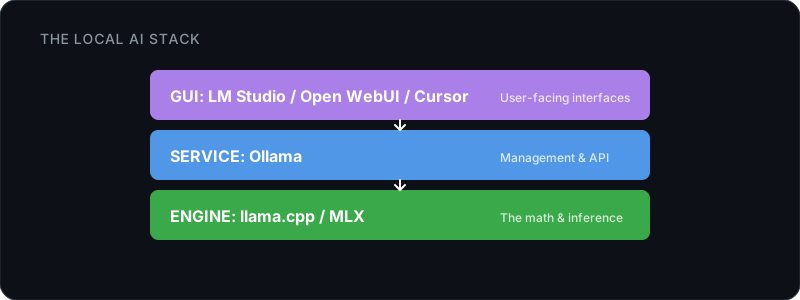
At the bottom is llama.cpp, the C/C++ engine that does the actual math. It reads GGUF files and runs on your CPU, GPU, or both. Almost everything above it is a wrapper that makes it more approachable.
Ollama adds a model registry, an API server, and simple commands (ollama pull, ollama run) on top of llama.cpp. If you’re building an app or want a local API, this is your go-to. LM Studio goes further with a graphical interface: model browser, download manager, side-by-side comparisons. Unsloth Studio is newer still, combining inference with training in a local web UI, which is useful if you want to both run and models without writing code.
When to Use What
| You want to… | Use |
|---|---|
| Get started fast, run from terminal | Ollama |
| Browse and compare models visually | LM Studio |
| Build an app with a local API | Ollama (OpenAI-compatible API) |
| Train and run models, no code | Unsloth Studio |
| Maximum control, custom parameters | llama.cpp directly |
| Apple Silicon, best performance | (Apple’s framework, native Metal) |
| Serve to many users, production | vLLM (NVIDIA GPU, PagedAttention) |
Sharing Models Between Tools
Since all of these tools use GGUF files, you don’t need to download a model twice. Ollama stores its models in a local cache (~/.ollama/models on Mac/Linux). LM Studio has its own directory. You can point one tool at the other’s files, or just keep a shared folder.
If you downloaded a model through Ollama and want to use it in LM Studio (or vice versa), you can import the GGUF file directly rather than re-downloading gigabytes of data. The model format is the same.
The recommended path: Start with Ollama (you already have it from Module 1). When you want a visual model browser, add LM Studio. If you’re on Apple Silicon and want raw speed, try MLX. Everything else is for specific advanced use cases.
Matching a Model to a Task
Different models are good at different things. Here’s a quick framework for picking.
Three Questions
1. What kind of task is it?
| Task Type | What to Prioritize |
|---|---|
| Quick Q&A, casual chat | Speed. A fast 7-9B model beats a slow 70B one for this. |
| Coding | Specialization. A -Coder model beats a general model at the same size. |
| Math or logic puzzles | Reasoning. Look for -Thinking or -R1 models. |
| Creative writing | General quality. Bigger models handle nuance better. Q4 is fine here. |
| Analyzing documents | . You need a model with enough room to fit your document. |
| Understanding images | Multimodal. Look for -Vision or -VL models. |
2. How fast does it need to be?
If you’re chatting or using a coding assistant, you need fast responses. At least 10-15 tokens per second or it feels sluggish. For batch work like summarizing a stack of emails, speed matters less since you’re not sitting there watching.
Below ~5 tokens per second? The model is too big for interactive use on your hardware. Go smaller or drop the quant level.
3. Does it need to run alongside other things?
If you’re using the model through a code editor plugin (like Cursor or Claude Code in an ), it shares memory with your editor and potentially a dev server. A 9B model at Q4 (~6 GB) leaves plenty of room on a 16 GB machine. A 32B model might not.
Instruct vs. Reasoning Models
You’ll run into this choice a lot:
| Instruct Models | Reasoning Models | |
|---|---|---|
| How they work | Answer directly | Think step-by-step first, then answer |
| Speed | Fast | Slower (the thinking takes time) |
| Best for | Chat, writing, quick tasks | Math, logic, complex code, analysis |
| Trade-off | May miss nuance on hard problems | Overkill for simple questions |
Most modern models (like Qwen 3.5) have a toggleable so you can switch reasoning on for hard problems and off for quick ones.
When in Doubt
Just grab a general-purpose 9B at Q4_K_M. Runs fast on 16 GB, handles most things well, and gives you a baseline. When it struggles with something, that tells you what to look for next:
- Answers feel shallow? Try a larger model.
- Too slow? Try a smaller model or lower quant.
- Code quality is poor? Try a coding-specialized model. If it also can’t handle long documents, you need a longer context window.
Current picks: Model recommendations change fast. For up-to-date starter picks, coding models, reasoning models, and more, see our Model Reference.
What’s Next
You know how to pick a model. Module 3A: How Models Think explains what happens inside one, and Module 3B: How Models Fit covers the full memory equation. If you’d rather start using your model for real work, Module 4: What Can You Do With This? is where the practical stuff lives. For quick lookups: Model Reference, Hardware Reference, Hardware Calculator.