Build Custom Tools
When Off-the-Shelf Isn’t Enough
You’ve used chat interfaces, run , and automated tasks with shell scripts. At some point, you’ll want something that doesn’t exist yet. A Slack bot that answers questions from your internal docs. A CLI tool that classifies support tickets. A web app where customers chat with a model that knows your product.
That’s when you start building. This module is for developers. It covers the building blocks: talking to models in code, giving them tools to call, connecting them to your data, and testing what you build.
By the end of this module, you’ll be able to call a model from code, set up MCP tool connections, build a basic RAG pipeline, and write tests for LLM outputs.
Talking to Models Programmatically
Every model, local or cloud, exposes an API that follows the same pattern: you send messages, you get a response.
The Universal Pattern
You create a client, pass it a list of messages, and read the response. That’s it. Whether you’re using the Python SDK, the JavaScript SDK, or hitting the REST API directly, you’re doing the same three things. OpenAI, Anthropic, Google, and Mistral all follow this shape. The SDK names differ, but the pattern is interchangeable.
At the core, you send a list of message objects. Each object has a role (one of system, user, or assistant) and a content string. The system message sets the behavior. The user message is the input. If you’re continuing a conversation, you include prior assistant turns in order. You send that array to an endpoint and get back a response object with the model’s reply, token counts, and finish reason. That’s the full shape of every API call, regardless of provider.
Local Models Use the Same Pattern
Ollama exposes an OpenAI-compatible API on localhost:11434. That means any code written for the OpenAI SDK works with your local models by pointing the base URL at localhost instead of OpenAI’s servers. No other changes needed. This is the reason the OpenAI SDK pattern became the de facto standard. Write your app against it, and you can swap between local and cloud models by changing the base URL. Module 7 covers when and why you’d make that swap.
Streaming
For interactive applications, you don’t want the user staring at a blank screen while the model thinks. Streaming delivers as they’re generated, so text appears word by word as it’s produced. Every provider supports it, and for chat interfaces and coding tools, it’s the default.
System Prompts
Module 4 introduced system prompts as a way to shape behavior in a chat interface. In code, they work the same way but with more precision: you pass the system prompt as a separate field alongside your messages array. The advantage over a chat UI is that you can be surgical about format, tone, constraints, and failure behavior. Something like “return only valid JSON, no explanation” is trivial to enforce programmatically and easy to swap out when requirements change.
Giving Your Model Tools
A model that only generates text is limited to what’s inside its training data. Tool use lets it interact with the outside world: check a database, call an API, read a file, send a notification.
Function Calling
You define tools as JSON schemas, each with a name, a description, and a list of typed parameters. You send those schemas alongside the conversation. The model reads the descriptions and decides when a tool is the right thing to call.
When it wants to use a tool, it doesn’t run anything. It returns a structured request: essentially “I want to call lookup_order with order_id: A1234.” Your code receives that request, executes the actual function, and sends the result back. The model then uses the result to continue its response.
The model outputs a structured request: it asks your code to run the function. Your code decides whether to execute it. This matters for security: the model cannot trigger side effects without your code participating.
The Tool Loop
For tasks that need multiple tool calls, the pattern extends into a loop:
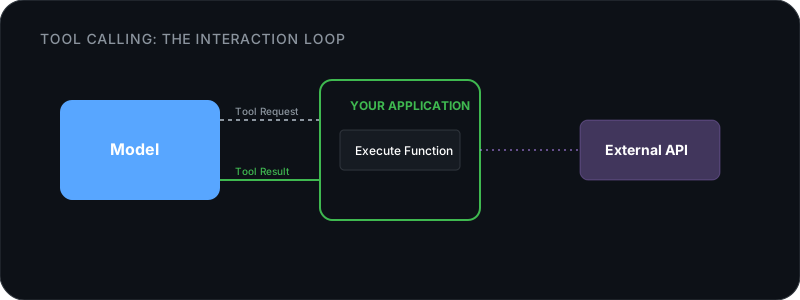
This is the same plan-act-observe loop from Module 5, but implemented at the API level. Frameworks like Google’s ADK and LangGraph wrap this loop for you. For simple cases, a while loop in your code is enough.
MCP: The Standard for Model-Tool Communication
If you want a model to interact with GitHub, you could spend days reading the GitHub API documentation, writing parsing code, and defining JSON schemas just to let the model read an issue. Or, you can use the Model Context Protocol (MCP).
MCP standardizes how models connect to external tools. It defines a shared protocol for tools and data sources so you don’t need to write custom integration code for each one. You simply connect a pre-built MCP server.
The Host-Mediated Architecture
Under the hood, MCP is a JSON-RPC protocol running over standard input/output (stdio) or HTTP. But the most important architectural detail is the trust boundary.
The model never connects directly to an MCP server. Instead, your application (the “host”) sits in the middle.
- The host connects to the MCP server and discovers available tools (
tools/list). - The host sends those tool descriptions to the model along with the user’s prompt.
- If the model wants to act, it asks the host to call a tool.
- The host executes the tool via the MCP server, and passes the result back to the model.
This design means the model cannot directly touch your systems. It can only request actions, and your code decides whether to run them. An autonomous model cannot secretly bypass you to execute arbitrary database queries; everything must route through the host, giving you the power to implement approvals or restrict dangerous tools.
What This Looks Like in Practice
Without MCP, trying to investigate a bug reported in an issue tracker means manual copy-pasting: switching from your terminal to the browser, copying the issue text, pasting it into Claude, asking for potential files, hunting down those files, copying their contents…
With the GitHub MCP server connected to your or CLI agent, you just say, “Look at issue #42 and propose a fix.” The host uses the MCP server to automatically fetch the issue text, read the relevant files, and write the patch. The protocol handles the wiring.
When to Build vs. Use Existing
Before writing a custom MCP server, check if one already exists. The ecosystem has servers for GitHub, Slack, PostgreSQL, filesystem access, web browsing, and hundreds of other services. The site’s Ecosystem Reference page has a curated list of MCP servers by category. Module 8 covers how to evaluate and install them.
Build your own when you need to connect to an internal system, a proprietary API, or a workflow specific to your team. The MCP spec is open and the SDKs (TypeScript, Python) make building a server straightforward.
Retrieval-Augmented Generation: Your Model + Your Data
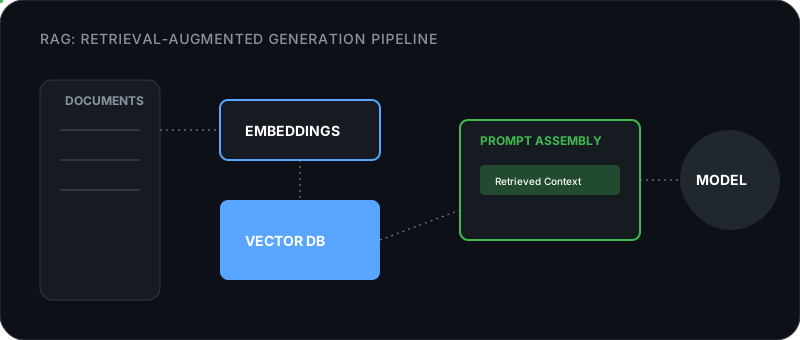
Module 4 introduced RAG at the user level: upload documents, ask questions, get answers. Under the hood, those tools run a pipeline. Here’s how to build one yourself.
The Pipeline
Chunking: How You Split Matters
The quality of a RAG system depends more on chunking than on anything else. Too small and you lose context. Too large and you dilute relevance with noise.
| Strategy | How It Works | Best For |
|---|---|---|
| Fixed-size | Split every N characters/tokens with overlap | Quick and simple. Works for uniform documents. |
| Semantic | Split at paragraph or section boundaries | Structured documents (manuals, docs, articles). |
| Recursive | Try splitting by heading, then paragraph, then sentence | Mixed content where structure varies. |
A good starting point: 500-token chunks with 50-token overlap. The overlap ensures you don’t lose context at chunk boundaries.
Embedding Models: The Math of Meaning
convert your text into multi-dimensional vectors. The math relies on : checking the angle between two vectors rather than their magnitude. Words or sentences with similar meanings get pushed to similar coordinates.
This results in the famous vector arithmetic property: the vector for king minus the vector for man plus the vector for woman lands almost exactly on the coordinates for queen. The relationships are mathematical.
Embedding models used for RAG are trained differently than standard LLMs. They use , aggressively pulling questions and their correct answers close together in vector space, while pushing unrelated text far away.
You don’t need a large LLM to run embeddings. Dedicated embedding models are tiny: nomic-embed-text is under 1GB and outputs 768-dimensional vectors. A local embedding model is exceptionally fast, private, and capable. Cloud embedding APIs from OpenAI or Voyage produce higher-quality vectors, but charge per request.
Vector Storage
Once you have embeddings, you need somewhere to store and search them:
| Tool | Type | Best For |
|---|---|---|
| ChromaDB | Embedded (Python library) | Prototyping, small datasets. Runs in your process. |
| SQLite + vector extension | Embedded | Simple apps. No extra dependency. |
| Qdrant | Standalone server | Production. Fast, scalable, good filtering. |
| pgvector | PostgreSQL extension | If you already use PostgreSQL. |
For a prototype, ChromaDB runs as a Python library inside your process. You create a collection, add your document chunks (with embeddings or with an auto-embedding function attached), and query by similarity. Pass in a question, get back the most relevant chunks. That’s the whole API.
Where RAG Struggles: The Retrieval Gap
A RAG pipeline is only as smart as its retrieval step. If the right text chunk does not make it into the prompt, the model cannot answer the question.
There are three ways retrieval fails, and three ways to fix it:
-
The Vector Blindspot: Pure semantic search (vector search) understands meaning but misses exact keyword matches. Searching for “error code 0x8A9” might fail if an embedding model doesn’t prioritize the exact string.
- The Fix: . Combine semantic vector search with traditional BM25 keyword search, merging the results.
-
The Context Limit: If you ask “What are all our customer complaints this year?”, compiling the answer requires pieces from hundreds of chunks across many documents. Basic RAG only grabs the top 5 chunks.
- The Fix: . Run a massive, broad retrieval to grab the top 100 possible chunks. Then, use a specialized “Reranker” model to evaluate and score those 100 chunks against the user’s prompt, passing only the most highly-relevant chunks to the final LLM.
-
When a question requires connecting information across multiple documents (“Did user A buy the same thing as user B?”), embedding models struggle to find that connection on their own. The fix here is not better retrieval. It’s skipping retrieval entirely. Larger let you load entire folders of raw text into the prompt and let the model find the relationship directly.
Testing and Evaluating Your Setup
Getting a prototype working is the easy part. Making it reliable takes more effort.
The Problem With “Looks Good to Me”
Language model output is non-deterministic, so the same prompt can produce different responses. A system that passed your manual check yesterday might fail on a slightly different input today. You need automated evaluation.
Three Levels of Testing
Start with unit tests for the code around the model: API calls, tool execution, prompt construction, response parsing. This is regular code, so test it like regular code. Mock the model response and verify your code handles it correctly.
Then add prompt regression tests. Keep a set of inputs with expected outputs and run them after any prompt change. For each test case, you store the input, the phrases that should appear in the response, and optionally phrases that shouldn’t. After a prompt edit, run every case and check whether the output still matches your expectations. You’re not testing the model, you’re testing that your prompt still produces the quality you need.
Finally, run your full pipeline end-to-end against a test set. Measure retrieval quality (did it find the right chunks?) and answer quality (is the response correct and complete?). Subtle failures show up here: the system finds a relevant chunk but the model ignores it, or retrieval returns five chunks but the answer only uses one.
LLM-as-Judge
For open-ended outputs where a simple string match won’t work, use a model to evaluate model output. You send the question, a reference answer, and the model’s actual response to a separate evaluator model. Ask it to rate accuracy and completeness on a 1-5 scale and give a brief reason. This isn’t perfect, but it scales. Run it across hundreds of test cases, track the average score over time, and a drop tells you your latest change broke something.
What to Measure
| Metric | What It Tells You |
|---|---|
| Retrieval recall | Did the right chunks get retrieved? (RAG systems) |
| Answer correctness | Is the response factually right? |
| Latency | How long does the full pipeline take? |
| Token usage | How much does each request cost? |
| Refusal rate | How often does the model say “I don’t know” when it shouldn’t? |
Track these over time so you catch regressions early.
Next Steps
-
Module 7: Local + Cloud — When to use local models, when to use cloud APIs, and how to combine both for the best cost/quality balance.
-
Module 8: Supercharge Your Setup — The MCP ecosystem, skills, plugins, memory tools, and where to find them.
-
Module 5: Agents — Agent architectures and frameworks, if you’re building agent-based applications.
-
Model Reference — Current model recommendations for every use case.