Agents
Beyond Chat: What Makes an Agent
By the end of this module, you’ll understand what makes an agent different from a chatbot, how to pick the right agent type for a task, and when agents are not the right tool.
Module 4 introduced the idea: an takes actions, not just answers. What separates it from a chatbot with a fancy prompt is tool use, planning, and memory.
Tool use means the agent can call external functions — read files, search the web, run code, call APIs, send messages. It interacts with the world outside the conversation instead of only generating text about it. Planning means it breaks a goal into steps and adjusts when something fails. Memory gives it context beyond the current conversation: many agents persist information across sessions, remembering what you’ve told them, what they’ve learned, and what worked last time. Put these three together and you have something that can get work done on its own.
Types of Agents
Not all agents are built the same. The range goes from simple single-task automations to coordinated teams of agents working in parallel.
Single-Task Agents
The simplest kind. You give it one job, one set of tools, and it runs once: summarize this document, classify these emails, generate alt text for a batch of images. It runs once, with no planning loop and no error recovery.
Most automation scripts from Module 4’s command-line pipelines are single-task agents. They’re reliable because the scope is narrow.
Multi-Step Agents
This is the plan-act-observe loop from Module 4. The agent breaks a goal into steps, executes them one at a time, checks results, and adjusts. A coding agent that writes a function, runs the tests, sees a failure, fixes the code, and tries again is a multi-step agent.
What makes this more capable than single-task is error recovery. When something goes wrong, the agent can reason about what happened and try a different approach. That lets it handle tasks where the path isn’t obvious upfront.
Multi-Agent Systems
Sometimes one agent isn’t enough. Multi-agent systems split work across specialized agents that communicate with each other.
A common pattern: one agent handles research (web search, document reading), another handles writing (drafting, formatting), and a coordinator decides who works on what.
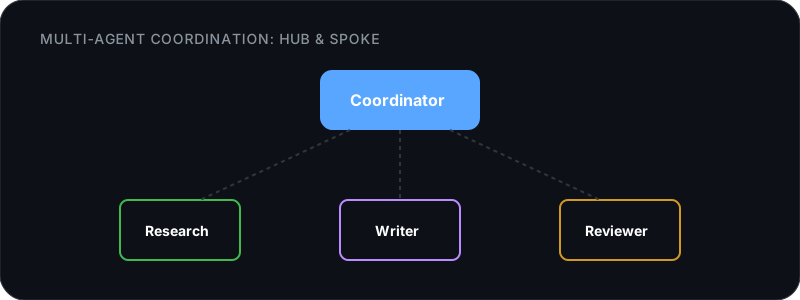
Each agent has a focused skill set, and the system is more capable than any single agent would be. The orchestration section below covers the specific coordination patterns and tradeoffs.
Swarms
The most advanced pattern. Large numbers of agents work on a problem with minimal central coordination. The agents don’t coordinate centrally — each one reads from shared state and writes back to it. The collective behavior comes from many small, independent decisions made in parallel. Active areas of exploration include large-scale code migration, distributed testing, and scientific literature review.
Swarms are mostly experimental today. For practical work, multi-step and multi-agent patterns cover most use cases.
Agents for Everyone
Agents aren’t just for developers writing code. The use cases span every domain.
Research Agents
Give a research agent a question and a set of sources, and it will gather information, cross-reference, and synthesize a report. Unlike a single chat prompt, it can follow threads: read one paper, extract references, read those too, and build a coherent picture across multiple sources.
Useful for competitive analysis, literature reviews, market research, and any task where you’d normally spend hours reading and synthesizing.
Automation Agents
These handle repetitive workflows: monitor a folder for new invoices and extract key fields into a spreadsheet. Watch a support inbox and draft responses for review. Scan a set of job postings and match them against your resume. Process a batch of images and organize them by content.
Anything you do the same way every time is a good candidate.
Personal Agents
AI that lives in your daily tools and handles the busywork: managing your calendar, drafting email replies, organizing notes, planning trips. Module 4 mentioned OpenClaw for messaging apps, but the category is broader. Agents are starting to integrate into productivity suites, browsers, and operating systems.
The security caution from Module 4 applies double here. Personal agents with access to your email, calendar, and files can do real damage if they misunderstand an instruction or get manipulated by a malicious prompt in an email they’re processing. Always restrict permissions to the minimum the agent needs.
Coding Agents: The Deep Dive
This section is for developers. Skip to Agent Frameworks if you don’t write code.
Module 4 introduced coding agents briefly. Here’s what makes them effective.
The Write-Test-Fix Loop
Module 4 introduced this loop briefly. Here’s what it looks like in practice and why it works.
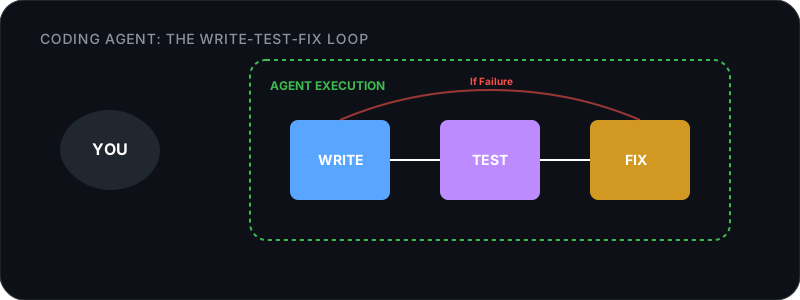
The loop works best when you have existing tests. Without tests, the agent is flying blind. It writes code, but has no way to verify it works.
Project Context Files
Every agent reads the codebase, but the best results come when you also tell it how your project works. Most agents support a project instruction file:
| Agent | File | What It Does |
|---|---|---|
| Claude Code | CLAUDE.md | Read on every session. Project conventions, do/don’t rules. |
| Cursor | .cursorrules | Shapes autocomplete and agent behavior per project. |
| OpenCode | .opencode.yaml | Provider config, model preferences, project context. |
| Copilot | .github/copilot-instructions.md | Repository-level instructions for Copilot. |
A well-written project file removes the need to re-explain your stack, conventions, and preferences every session.
Prompting Agents Well
Three rules that consistently produce better results:
-
Be specific about scope. “Fix the login timeout bug in auth.ts, line 45” beats “Fix the bugs.” The agent can read the whole codebase, but it works better when you narrow the search.
-
Provide context before asking for changes. “Read src/api/users.ts and src/db/queries.ts first. Then add cursor-based pagination following the pattern in src/api/posts.ts.” The agent doesn’t know which files matter unless you tell it.
-
Break big tasks into small steps. “Build the entire authentication system” is worse than “Let’s build auth in steps: 1. Add the User model. 2. Create register/login endpoints. 3. Add JWT. 4. Add middleware. Start with step 1.”
Agent Frameworks: Choosing Your Foundation
If you’re building agents programmatically (not just using them), frameworks save you from reinventing the tool management, memory, and orchestration plumbing.
What a Framework Gives You
Without a framework, building an agent means writing your own:
- Tool registration and calling logic
- Prompt construction with tool results
- Error handling and retry logic
- Memory and state management
- Multi-agent coordination
Frameworks handle that plumbing so you can focus on what your agent actually does.
Three Tiers of Framework
The specific tools change often, but the categories hold steady.
Minimal frameworks give you the plan-act-observe cycle and let you handle everything else. They’re easy to understand, give you full control, and work well for simple agents where you want to see exactly what’s happening.
Full-stack frameworks bundle tool management, memory, structured output, multi-agent coordination, and often a visual debugger. They’re more opinionated and take longer to learn, but they handle the hard parts of running agents in production. Google’s ADK, LangGraph, CrewAI, and AutoGen fall in this category.
No-code platforms like n8n, Make, and Zapier take a different approach: you build agent workflows visually, connecting to hundreds of services without writing code. “When a new email arrives, classify it, draft a response if it’s a support question, and file it in the right folder” becomes a drag-and-drop workflow. Good for prototyping or for teams where the people closest to the problem aren’t developers.
How to Choose
| Question | If yes… |
|---|---|
| Is this a one-off script? | Skip the framework. Use the model’s API directly. |
| Do you need tool use and error recovery? | A minimal framework is enough. |
| Do you need memory, multi-agent, or production monitoring? | Use a full-stack framework. |
| Are non-developers building the workflow? | Use a no-code platform. |
| Does your team already use a specific language? | Pick a framework in that language. |
A simple agent that calls two tools doesn’t need a full orchestration platform. Start minimal and add complexity when you actually need it.
Multi-Agent Orchestration
When one agent can’t handle a task alone, you coordinate multiple agents. Three coordination patterns come up repeatedly.
Hub-and-Spoke
One lead agent delegates tasks to worker agents and collects results. The workers don’t talk to each other, which makes the whole thing easier to reason about and debug.
Lead: "Refactor the auth module"
  → Worker 1: "Rewrite the JWT validation"
  → Worker 2: "Update the tests"
  → Worker 3: "Update the API docs"
Lead: collects all results, reviews for consistency
Pipeline
Agents work in sequence. The output of one becomes the input of the next. Good for workflows with clear stages: research → draft → review → publish.
Peer-to-Peer
Agents communicate directly with each other, without a central coordinator. More flexible, but harder to debug. This is how some experimental “agent team” features work, where agents negotiate and coordinate in real time.
Every message between agents costs . A three-agent pipeline might use 3-5x the tokens of a single agent doing everything. Use multi-agent only when the task genuinely benefits from specialization or parallelism.
When Agents Fail (And When They’re Overkill)
Agents are powerful, but they fail in predictable ways. Knowing the failure modes helps you decide when to use them and when not to.
Common Failure Modes
| Failure mode | What happens |
|---|---|
| Hallucinated tool calls | The agent calls a tool that doesn’t exist, or calls a real tool with nonsensical arguments. More common with smaller models that haven’t seen enough tool-use training data. |
| Infinite loops | The agent tries something, it fails, the agent tries the same thing again. Without a loop-detection mechanism or a step limit, it burns tokens forever. |
| Context window exhaustion | Long sessions accumulate tool results, error messages, and conversation history. Eventually the fills up and the agent starts losing track of earlier information. Responses degrade. |
| Compounding errors | Step 3 builds on the wrong output from step 2, which was based on a misunderstanding in step 1. By step 5, the agent is confidently executing a plan that’s completely wrong. Multi-step agents need checkpoints where a human can verify direction. |
When Agents Are Overkill
A well-crafted prompt often does the job faster and more reliably than an agent.
| Situation | Better approach |
|---|---|
| One-shot text transformation | A single prompt, no agent needed |
| Simple data extraction | A prompt with structured output |
| Task with no tool use needed | Just chat with the model |
| Task where every run is different | Interactive conversation, not automation |
If the task can be done in one prompt, don’t build an agent. If it needs multiple steps, tool access, and error recovery, the added complexity is worth it.
The Reliability Question
Agents are reliable for well-defined tasks with clear success criteria. “Run the tests and fix failures until they pass” works because “tests pass” is unambiguous. “Make this codebase better” doesn’t work because “better” isn’t something the agent can verify.
As models improve, the boundary between “well-defined enough” and “too ambiguous” keeps moving. But for now, clear goals with measurable outcomes are what make agents work.
Measuring Agent Performance
Three things to track before and after deploying an agent:
Cost. Each step uses tokens. Multi-agent pipelines multiply costs quickly because every message between agents, every tool result, and every retry burns through the context window. Estimate before deploying by counting expected tool calls and multiplying by the average tokens per call. A pipeline that looks cheap in testing can get expensive at scale.
Latency. Agents are slower than single-pass models. Measure end-to-end time, not just model response time. Tool calls, retries, and inter-agent messages all add up. If a task takes ten seconds in the terminal but the agent version takes two minutes, something in the pipeline is slower than expected.
Reliability. Log every tool call and its result. If you can’t see what the agent did, you can’t debug it when it goes wrong. Most frameworks give you a trace. Use it. A run that produces a wrong answer but has a full trace is fixable. A run that silently produces a wrong answer is not.
What’s Next
Ready to build your own tools? Module 6: Build Custom Tools covers APIs, function calling, MCP, and RAG pipelines. For deciding when to use cloud models instead of local, Module 7: Local + Cloud. For the ecosystem of MCP servers, skills, and plugins, Module 8: Supercharge Your Setup.