How Models Fit
Compression Without Losing the Plot
By the end of this module, you’ll understand why quantization works, how KV cache trades memory for speed, and what sets the ceiling on how fast a model can run.
Module 2 introduced quantization with a salary analogy: round $123,456.78 to $123,000 and you barely notice. Here’s what’s actually going on under the hood.
What Gets Compressed
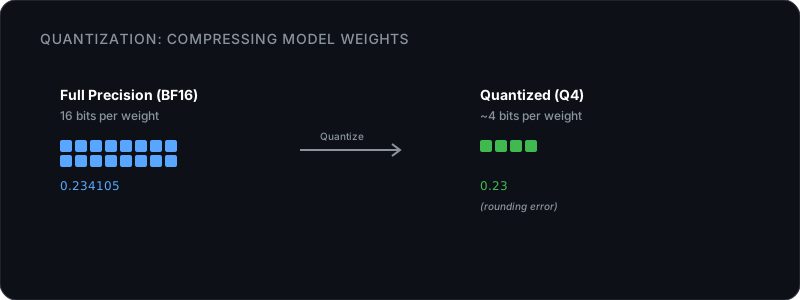
A model is billions of numbers stored at high precision, typically 16 bits each ( or ). Quantization reduces the number of bits used per value. Instead of 16 bits (65,536 possible values per number), a 4-bit quantized model uses just 4 bits (16 possible values).
That sounds brutal. 65,536 options down to 16. But it works because neural networks possess . Facts and patterns are encoded across thousands of weights at once. Corrupting or rounding one weight does not erase the fact; the network routes around the noise. The small inaccuracies cancel each other out.
This creates a recognizable shape in model performance, often called the cliff. If you plot a model’s intelligence as you compress it, the line is almost perfectly flat from FP16 down to 5 bits. Quality barely drops. Between 4.5 and 4.0 bits, a slight curve begins. Below 3 bits, the network runs out of redundancy, the rounding errors compound, and intelligence falls off a cliff. This is why 4-bit quantization (Q4) is the universal sweet spot: it sits right on the edge of the cliff.
Block Quantization: Not All Rounding Is Equal
The simplest approach would be to round every number the same way. That’s wasteful. Some parts of a model are more sensitive than others. The attention layers that route information between matter more than deep feed-forward layers that store general knowledge.
Modern quantization works in blocks, typically 32 to 256 values at a time. Each block gets its own scale factor, which lets the compression adapt to the local range of values. If one block has values between 0.1 and 0.3, and another has values between -5.0 and 5.0, each block uses its 16 available slots differently.
The _K in Q4_K_M means “k-quant,” which does exactly this: block-level quantization with per-block scaling. The _M means the method keeps particularly sensitive layers (like the first and last few) at slightly higher precision, while compressing the middle layers more aggressively.
Importance-Aware Compression
There’s a more advanced approach called importance-matrix quantization (the “I” in IQ2_XXS). Instead of treating all weights equally, it uses a small sample of real data to figure out which weights matter most. The important weights get more precise representation. The rest get compressed harder.
This matters at very low bit depths. At 4 bits, standard k-quants and importance-aware quants perform similarly. At 2-3 bits, importance-aware methods produce better output because they spend their limited precision budget where it counts.
For most people, k-quants at Q4 or above are the right choice. I-quants matter when you’re trying to squeeze a model into an unreasonably small memory footprint.
The Full Memory Equation
Module 2 gave you the napkin math: model file size should be under 75% of your available . Four things are actually competing for that memory.
Four Things Sharing Your RAM
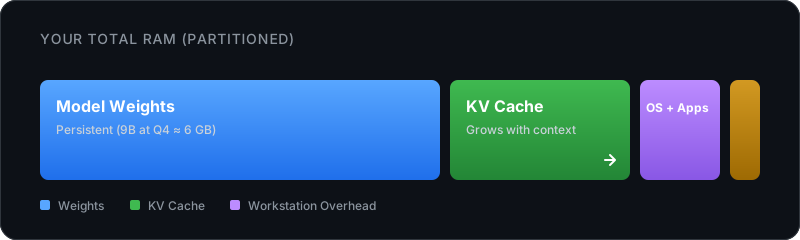
Model weights are the big, fixed chunk. A 9B model at Q4 takes about 6 GB. A 70B model at Q4 takes about 40 GB. This number doesn’t change during use.
The is the part that grows. “KV” stands for Key and Value, the two vectors from the attention mechanism (covered in Module 3A). Every time the model processes a token, it saves that token’s Key and Value so it doesn’t have to recompute them on the next pass. The longer your conversation, the more of these pile up. (More on this in the next section.)
The remaining two are smaller but real. Your OS and running applications typically need 3-4 GB (more if you have a browser or open), and compute buffers take roughly 0.5-1 GB for scratch space during calculations.
The Formula
Total RAM needed = model weights + KV cache + activations + OS overhead. For a 7B model at Q4_K_M, that’s roughly: 4.5 GB (weights) + 0.5-2 GB (KV cache at typical context) + ~0.5 GB (overhead) = 5-7 GB.
A practical rule: leave 20-25% of your total RAM free beyond the model file size. That covers the KV cache for normal conversation lengths, the OS, and buffers. (The per-tier breakdown is in Module 2’s napkin math and the Hardware Reference.)
Why Long Conversations Get Expensive
The KV cache is the reason a model that fits comfortably in memory can start struggling twenty minutes into a conversation.
The Autoregressive Loop: Why We Cache
Models generate text one token at a time. To pick the next word, the attention mechanism needs the Key and Value vectors for every previous token in the conversation.
Without a cache, the model would have to recompute the math for the entire conversation history just to predict the next single token. That is quadratic compute, and it would bring generation to a crawl.
Instead, the stores the Key and Value vectors as it goes. When generating a new token, the model only computes the math for the new token, and pulls the rest from the cache. It trades memory to save compute.
The Query vector is not cached because it only depends on the current token — it can be recomputed cheaply from scratch. The Key and Value vectors depend on every previous token in the sequence, so recomputing them from scratch at each step would be prohibitively expensive. Caching K and V trades memory for the compute cost of reprocessing the full context on every generation step.
Every token in your conversation adds to this cache. For a 32-layer model, one token creates 64 vectors (2 per layer). It grows linearly with conversation length, which is why clearing the cache (starting a new conversation) is the fastest way to relieve memory pressure on your machine.
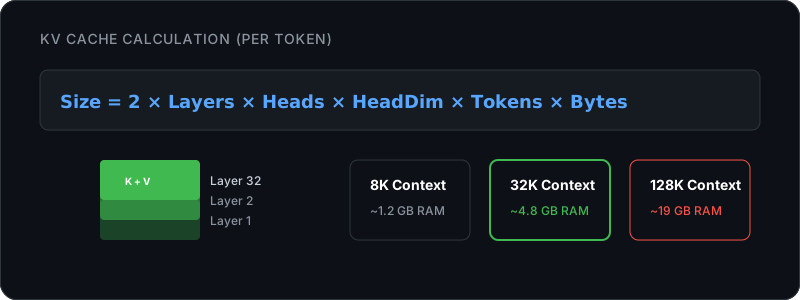
At 128K tokens, the KV cache alone is nearly triple the model’s weight file. This is why sizes on the spec sheet don’t mean much if your hardware can’t afford the memory for that many tokens.
Why It Feels Like the Model Slows Down
You might notice the model getting slower as a conversation goes on. Two reasons:
-
More KV cache means less room. If the total starts pushing against your RAM limit, the OS starts swapping to disk. Disk is orders of magnitude slower than RAM.
-
Attention scales with sequence length. The model has to check relevance against every previous token. More tokens means more work per prediction. Standard attention is quadratic: double the context, quadruple the attention compute.
What You Can Do About It
The simplest fix is to start fresh conversations. When you notice things slowing down, start a new chat and copy over anything important.
KV cache quantization compresses just the cache, leaving the model weights at their original precision. Engines like llama.cpp let you do this directly. Running the cache at Q4 instead of FP16 cuts its memory by roughly 75% with minimal quality loss for most tasks.
For even more aggressive compression, see The Rules Keep Changing below.
Memory Bandwidth: The Hidden Speed Limit
Module 2 showed that identical models run at wildly different speeds on different hardware, and gave you the bandwidth table. The reason comes down to one bottleneck.
Why Bandwidth Matters More Than Compute
Each transformer layer is a series of matrix multiplications. Generating a single token requires one complete forward pass through all those layers. That means to generate one token, the processor must read every single weight matrix across the entire model exactly once.
A 9B model at Q4 is about 6 GB. At 30 tokens per second, the processor is pulling that entire 6 GB file through its bus 30 times every second. That is 180 GB/s flowing from RAM into the processor cores.
The math itself is fast. Modern processors can multiply billions of numbers per second. The true bottleneck is delivery: getting those numbers from RAM to the cores quickly enough. That delivery speed is your system’s memory bandwidth.
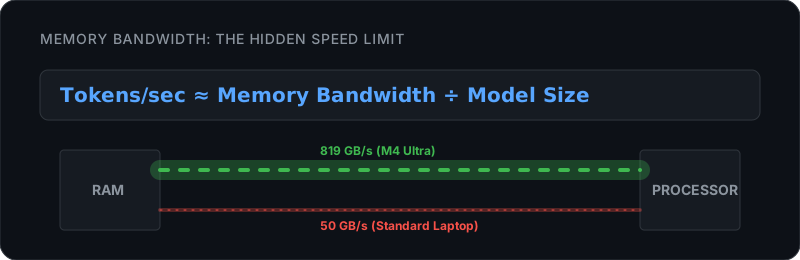
This formula also explains why smaller quantized models are faster. A Q4 model is roughly half the size of a Q8 model, so it reads from memory in half the time, meaning roughly double the tokens per second on the same hardware.
Alternative Architectures: Beyond the Transformer
The has dominated since 2017, but it has one big cost: scales quadratically with sequence length. Double the context, quadruple the computation. That’s expensive for very long documents.
State Space Models: The Linear Alternative
An alternative family called State Space Models (SSMs), with Mamba as the most well-known, takes a completely different approach. Instead of having every token look at every other token, SSMs maintain a compressed running summary. Each new token updates the summary and reads from it, never looking back at the raw history.
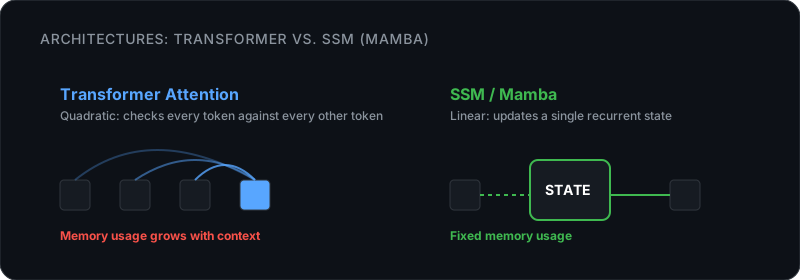
The trade-off: SSMs are faster at long contexts but can miss precise details buried deep in the input. Transformers can always attend to any specific token. SSMs compress everything into a summary, which is lossy.
Hybrid Architectures: Best of Both
The current trend is combining both. Models like NVIDIA’s Nemotron 3 and newer Qwen variants alternate between transformer layers (precise but expensive) and SSM-like layers (fast but approximate). A 3:1 ratio of fast layers to attention layers can give you most of the transformer’s precision with much less memory overhead.
Only 25% of the layers need a KV cache. That cuts KV memory by 75%, which is why some newer models can handle very long contexts without melting your RAM.
Why This Matters for You
If you’re running models with short prompts and conversations under 8K tokens, architecture differences don’t matter much. Standard transformers work great. But if you need long-context work (analyzing documents, coding on large codebases, extended conversations), keep an eye on hybrid models. They’ll use less memory and run faster on the same hardware.
The Rules Keep Changing
The techniques keep improving, and a few developments are worth watching.
Google’s TurboQuant compresses the KV cache to 3 bits with zero measured accuracy loss, a 6x reduction. If your model at 32K context had a 4 GB KV cache, TurboQuant drops that to under 700 MB. Community implementations are landing in llama.cpp, , and PyTorch.
Apple’s LLM in a Flash takes a different angle entirely: stream model weights from SSD instead of loading everything into RAM. Keep the full model on fast storage, load only active layers into memory, swap intelligently. Apple demonstrated a 400B model running on an iPhone 17 Pro this way. If it matures, “does it fit in RAM?” becomes “does it fit on my SSD?”
On the speed side, speculative decoding pairs a tiny “draft” model with the real one. The draft model predicts several tokens quickly, then the big model verifies them in a single pass. When the draft guesses right (common for predictable text), you get multiple tokens for the cost of one pass. Memory stays the same, speed goes up.
Each of these is already landing in llama.cpp, MLX, or both. Most current models also ship with Grouped Query Attention (GQA) baked in, which shares key/value heads across multiple query heads — that’s why real KV cache sizes tend to run smaller than the formula above suggests. The hardware minimums for a given task keep dropping.
What’s Next
You understand how models fit on your hardware. Module 4: What Can You Do With This? puts all of this to work: proper interfaces, personal assistants, coding tools, document analysis, and agents. For hardware-specific lookups: Hardware Reference and Hardware Calculator.